This is an old revision of the document!
Register Read/Write Window
The Register Read/Write window allows you to read and write bytes of data from and to a DSP IC, for some DSPs it also performs program file loading and data capture.
To access the Register Control window:
- Click the Hardware Configuration tab at the top of the workspace.
- Right-click on the DSP processor block, (click outside of the part number field, e.g. AD1701) to display the context menu.
- Select Read/Write Window from the menu.
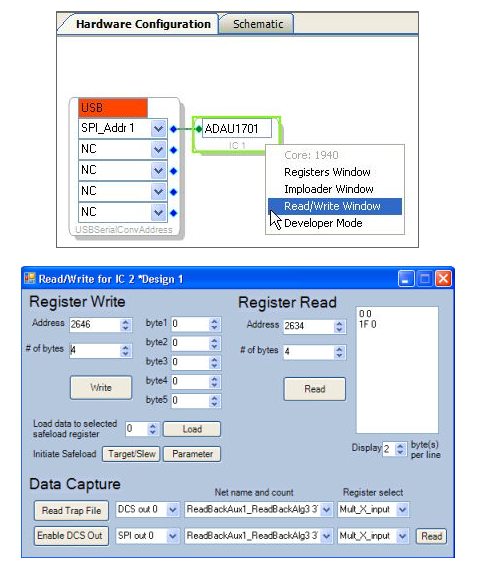
Register Read/Write
This window allows you to read and write bytes of data directly to Parameter RAM, Program RAM, Target/Slew RAM, and available registers, which is useful for sending specific parameters directly to the DSP and also checking parameter values that have been sent.
- For writing, set the address, number of bytes, the data to be written, and click Write.
- For reading, set the address and number of bytes, and click Read. These values will be displayed.
Data Capture
These functions allow any node in the signal-processing flow to be sent to control-port-readable registers or to a digital output pin, provided it's supported by your particular hardware settings. This can be used to monitor and display information about internal signal levels or compressor / limiter activity. The digital output registers are output on SDATA_OUT7 when the data-capture serial-out enable bit (bit 14) is set in serial output control register 2. (This is AD1940-specific). Clicking Enable DCS Out sets this bit for you.
- Read the generated trap.dat file by clicking Read Trap File, which will populate the lists with the available TRAP addresses.
- Select one of the 6 independent control-port-readable data-capture registers (SPI 0-5) or one of two digital output capture registers (DCS 0/1).
- Select the Net Name and its count that you wish to capture. The count corresponds to the program step number where the capture will occur.
- Select the register for output. This register will be transferred to the data-capture register when the program counter equals the capture count. Options are:
- Mult_X_input - multiplier X input
- Mult_Y_input - multiplier Y input
- MAC_out - multiplier-accumulator output
- Accum_fback - accumulator feedback
- Click Read to see the data. The captured data are in 5.19 twos-complement data format, the 4 LSBs truncated from the internal 5.23 dataword.
Load Files
These functions allow loading a previously compiled program or parameter file to the hardware, provided this feature is support by your particular DSP part. This can be used to quickly compare project settings.
To load a file:
- Click the “Click here to browse for program/parameter file” control.
- Locate the *.dat file you wish to load (e.g. hex_program_data.dat) and click open, he numerical control will display the size of the program bytes.
- Press Load to send data to the hardware.
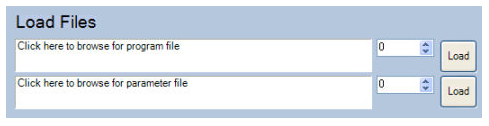
File load functionality for the AD1940/AD1940 is available through the Imploader.