Interface Read
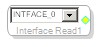
The Interface Read block takes value from one of eight interface registers and makes it available in the schematic design. The yellow pin can connect to GPIO Conditioning block's yellow input pins. It is especially useful for parts that self-boot and use external interface registers.
Select a particular interface from the drop-down.
- Every input must be connected to an output, else there will be errors on compilation.
- Observe that as you drag more output blocks to your schematic, your number of interfaces available decreases.
- To change the block's Sampling Rate, Right-click the block name and select Set Sampling Rate, which will open the Sampling Rate window (default is 44.1 kHz).
Note: This block is only available for DSPs with GPIOs or auxiliary ADC.