Table of Contents
Sine Tone with Phase and Gain(ADSP-SC5xx/215xx)
This module can be used to generate a Sine Tone at different frequencies. The gain and phase of the algorithm can be configured
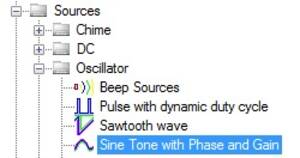
Output Pins
| Name | Format [int/dec/float] - [control/audio] | Function Description |
|---|---|---|
| Pin 0: Output | audio | Output Sine Tone signal from the module |
Grow Algorithm
The module supports growth to a maximum of 14 channels
Configuration

| GUI Control Name | Default Value | Range | Function Description |
|---|---|---|---|
| GUI Control Name | Default Value | Range | Function Description |
| on/off | off | on/off | Turns the output of the cell on or off. When the output is off, the output pin will output a constant value of 0. |
| Frequency | 500.01 | 0.01 to 0.5*Sample Rate | The sets the frequency of the sine tone that is output from the cell. |
| Initial Phase | 0 | 0 to 360 | Initial Phase of the sine signal. |
| Gain | 0 | -138 to 24 dB | The gain to be multiplied on the sine tone |
DSP Parameter Information
| GUI Control Name | Compiler Name | Function Description |
|---|---|---|
| Frequency_cos | ToneGenwithPhaseGainBlkAlg1cos | Cos value for generating a particular frequency |
| Frequency_sin | ToneGenwithPhaseGainBlkAlg1sin | Sin value for generating a particular frequency |
| Phase | ToneGenwithPhaseGainBlkAlg1phasevalues | Cos and Sine value packed for all growths to generate a specific phase |
| Gain | ToneGenwithPhaseGainBlkAlg1gain0 | Gain value |
Here,
- Green - Algorithm Name
- Red - Instance Number (Changes for each instance)
- Blue - Parameter Name
- Orange - Growth
Algorithm Description
This modules generates Sine tone based on the Frequency and the Phase set in the GUI. Gain of the sine tone can be adjusted from the GUI. Sine Tone can be switched On/Off using the On/Off checkbox in the GUI.
Supported ICs
- ADSP215xx
- ADSPSC5xx
Sine Tone With Phase and Gain(ADAU145x)
The Tone (Lookup/Sine) block generates a tone from a lookup table. The gain and the initial phase of the algorithm can be configured. Set the tone frequency in text field or use the arrows; the checkbox turns the tone on and off.
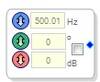
To change the source's Sampling Rate, Right-click in the block and select Set Sampling Rate, which will open the Sampling Rate window (default is 44.1 kHz).
Output Pins
| Name | Format [int/dec/float] - [control/audio] | Function Description |
|---|---|---|
| Pin 0: Output | complex-audio | Output Sine Tone signal from the module |
GUI Control
| GUI Control Name | Default Value | Range | Function Description |
|---|---|---|---|
| on/off | off | on/off | Turns the output of the cell on or off. When the output is off, the output pin will output a constant value of 0. |
| Frequency | 500.01 | 0.01 to 0.5*Sample Rate | The sets the frequency of the sine tone that is output from the cell. |
| Initial Phase | 0 | 0 to 360 | Initial Phase of the sine signal. |
| Gain | 0 | -144 to 42 dB | The gain to be multiplied on the sine tone |