ADAU1466 self boot issue
Hi,
I have read the forums and i cannot fathom why my 1466 eval board will not self boot.
I have followed instructions to the letter.
the best i can get is LED indication of LR clocks D3 D4 D5. But no audio passes and i cant seem to get audio to pass through until i Link compile download again.
Also where is S2?!?!?!
I have programmed a 1452 board no issue.
What am i missing?
Thanks
James
Edit Notes
fixed : wrong eeprom values
[edited by: jamieh1210 at 7:48 PM (GMT 0) on 14 May 2019]
Audio Signal Processors
SigmaDSP Audio Processors
adau1466
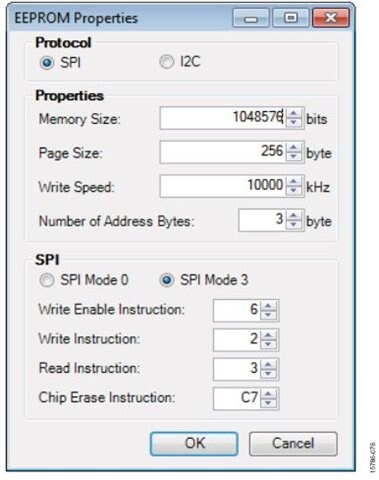
I have the same issue what eeprom values do you use please ?
Hello paulo31,
Please refer the below picture to set E2prom properties. I have taken this picture from the user guide where you can refer the complete step by step procedure of self booting.
Check the basic things as well they are :
1) In switch S3, Turn OFF the self boot button while writing to E2prom.
2) Once you wrote to E2prom successfully , then turn ON the self boot switch and press and release the reset button.
3) If your issue still exists, try erasing the E2prom and program it freshly.
Most of the booting issues in Eval boards will be solved by these steps. If not , then kindly do reply with some info on what and all you tried.
Regards,
Harish
I have the same setup.
I solved the problem by disabling some MP functions. Probably MP0 and MP1
Thank you !
Please log in to reply.