BUG Report: Sigma Studio 4.6 1452 Incorrect Tone1 Status
Running Sigma Studio 4.6 on a 1452.
I have a 1kHz, 0,0 Tone1. After saving and reloading the project, the Tone1 status has the 'On' checkbox checked, yet there is no output.
Clearing and rechecking the 'On' checkbox turns Tone1 on.
Not critical, but annoying.
M
Edit Notes
Sigma Studio Bug Tone1 Status
[edited by: MCSP at 11:35 AM (GMT -4) on 9 Apr 2021]
Audio Signal Processors
adau1452
sigmastudio
SigmaDSP Audio Processors
Hello,
Yes, that would be annoying, I tried it and couldn't duplicate your results. To make sure we're both attempting the same thing, my project is attached below. Please download it, see if it works without having to clear and recheck the box, and compare to your project and its results. If the error persists, perhaps uninstalling and reinstalling SigmaStudio might fix it.
Best regards,
Bob
6644.Save-tone-checkbox.zip
Hi Bob:
Thanks for the reply; your code works just fine; mine (which has several Tone blocks) still fails consistently. Strange in that only the 'Tone1' block has this failure mode.
I can upload it; but be aware it is designed for the 1452 (original version) eval board, so it drives the GPIO7 and 8 LEDs.
(The best way to upload the project is not clear to me)
R,
M
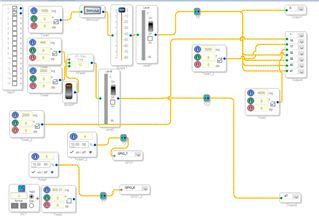
Hello,
To upload a project, zip it first. Then insert the resulting .zip archive file the same way as a picture. I notice that in your screenshot, Tone1 has a Stimulus block in series with its output without a corresponding Probe block. Though this shouldn't matter, perhaps this is confusing the program. Try removing the Stimulus block.
BR,
Bob
Bob:
Thanks and thanks! I'll remove the stimulus block...and I'll exercise the upload - perhaps another time.
M
Bob:
Well, we may have discovered something curious. I've removed any stimulus probe blocks. See the attached.
When saved (with Tone1 on) and reloaded, the tone1 check box is still filled, but the Tone is off. Curiously enough, the other two Tones in this system (which drive the available LEDs on the 1452eval board) do wake up properly.
R,
M6014.tone testd.zip
Hello MCSP,
Yes I got the same results with your uploaded project. The tone doesn't work upon a Link-Compile-Download -- just like you I had to cycle the check box to make Tone1 go. And you don't even need to close and re-open the project to see this behavior., Once you have the tone running, just Link-Compile-Download again and the tone stops. Finally, I remade your project one step at a time --removing the pulse gens, the level meter, the volume control, and adding a second output. At each step I tried it and none of this helped. Now I have two projects with exactly the same blocks, one which works and one which doesn't. I don't have tools to digitally compare the two, yet there must be some difference. To me this looks like the perfect issue to stump an ADI support engineer. I suggest you re-name your thread so it begins with [Bug Report] -- which is the standard format for such. Edit: I just tried the no-tone project with SigmaStudio 3.17 and still no tone at startup.
BR,
Bob
Hello MCSP and Bob,
I found that I was able to replicate the issue. When I look at the Params window I see that the gain parameter is zero which is off. If you uncheck it and check it then it is one and it is on. Recompile and it goes back to zero.
I then deleted the osc block and reinserted it from the library and it all worked fine. So it seems that either the code has somehow become corrupted or it is an issue with versions or other framework changes.
I put in bug work request report and we will see if they find anything.
Thanks,
Dave T
Please log in to reply.