SigmaStudio Tone control
Good morning,
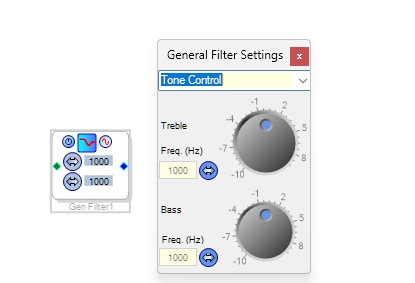
I really like the algorithm in the attached picture and I would like to be able to set it using external devices. Unfortunately, I noticed that when turning the treble/bass knobs, not one register changes, but several. Is there any way to bypass this? Alternatively, is there a similar algorithm with the possibility of external control.
Hello,
Several registers change because the tone controls, like all second-order filters, work with sets of five coefficients. The filter constructs each of its output samples from its input sample, the previous two input samples, and the previous two output samples. Each of these is multiplied by its corresponding coefficient before they're all added together for the present output sample. Lather, rinse, and repeat -- 48,000 times each second! SigmaStudio recalculates all the coefficients each time you set the GUI controls, using formulas much too complex for the DSP to figure on its own. That's where your job comes in -- programming the needed formulas into a microcontroller and safeloading the resulting coefficients into the appropriate registers.
Tone controls are essentially shelf filters, which the General Second-Order Filter block can implement as well. If all you need is basic tone controls with variable boost or cut yet other characteristics fixed, check out the Index Selectable Filters (a.k.a. Lookup Filters). SigmaStudio pre-calculates coefficients for all possible settings, storing them in parameter memory for the DSP to call up at runtime. Here's an example of a tone control using Lookup filters.
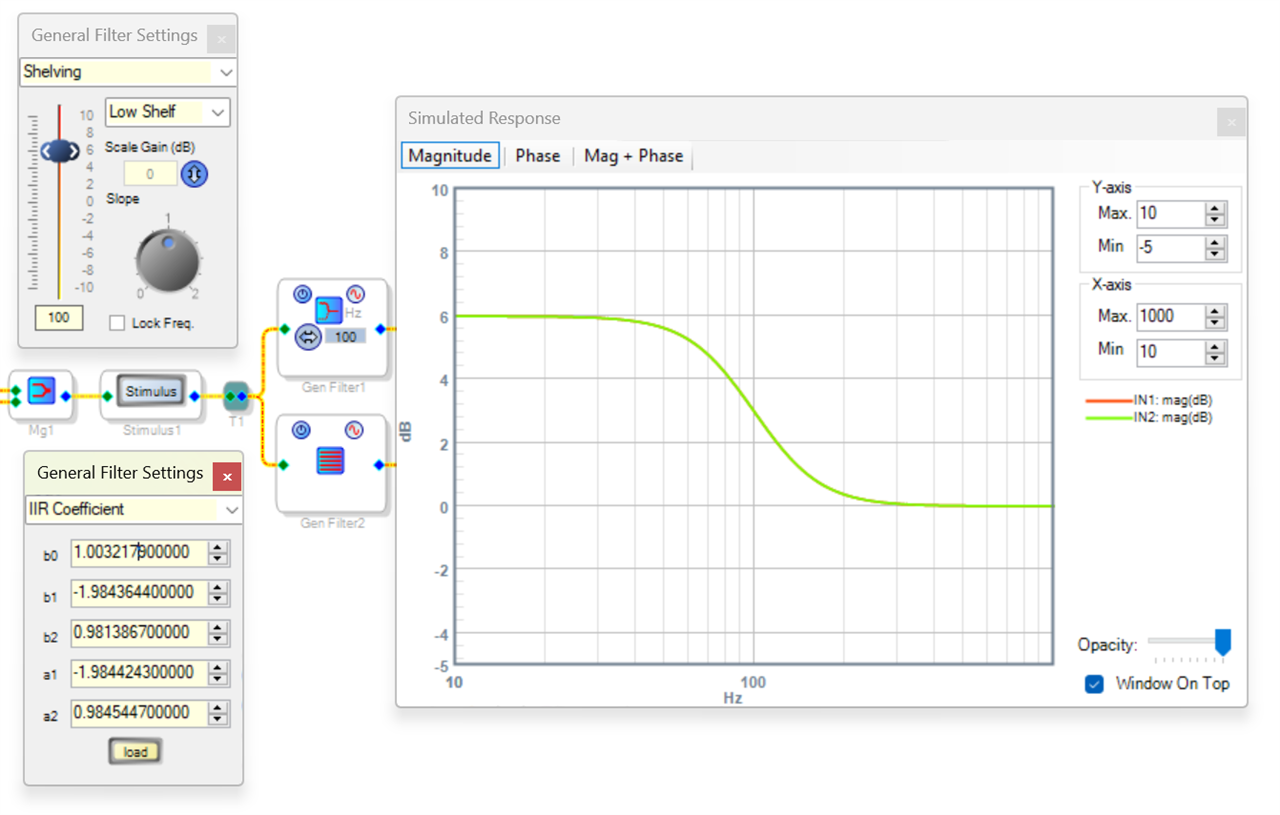
Perhaps instead, you would like to give the end user control over the "hinge" frequency and sharpness of its curve as well. In this case, we'll continue with calculating the coefficients generally. The legendary Brett G., a former ADI Support Engineer who has helped me immensely in my early days, came up with a spreadsheet for calculating the coefficients. I've been expanding it to handle additional filter types. Below I show two filters, one GUI controlled and the other via typing coefficients directly into the filter. They're both set for Bass Boost of 6 dB hinged at 100 Hz with a slope factor (sharpness) of 1.0. Note how their predicted frequency responses lie on top of each other. By examining the spreadsheet's formulas to work into your microcontroller code, you can implement the coefficients. If I remember right, you'll need to flop the signs of the "a" coefficients to match how the ADAU1401 / 1701 uses them. Implement the High-shelf (treble) control the same way, and cascade the two stages.
7282.1st-2nd-Order_IIR_Coefficient_Calculator.zip
1701-Bass.zip
With the coefficients in hand, now you'll need to safeload them into the DSP via I2C or SPI. There's a few tutorials on EZ for this, including this one. I've always said that getting external filter control working is a rite of passage for SigmaDSP developers!
Best regards,
Bob
Hello, thank you for the really extensive answer.
I tried to use the example you provided, but unfortunately after adapting it to my needs it doesn't work :(
I care about these 3 sliders.
tonecontrol.dspproj
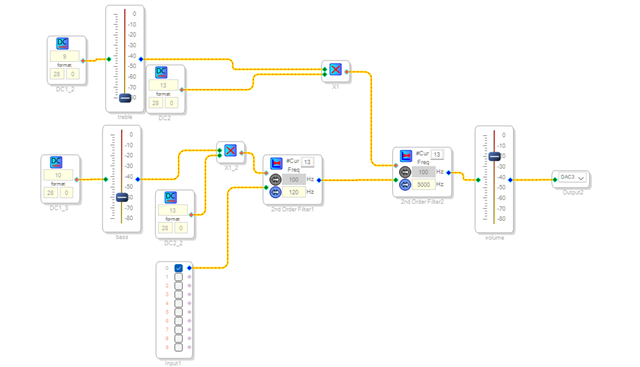
Hello, after a few hours I managed to get the tone control to work :D
Only compared to the original algorithm I provided in the post, it works poorly. Do you have any idea how to improve it?4621.tonecontrol.dspproj
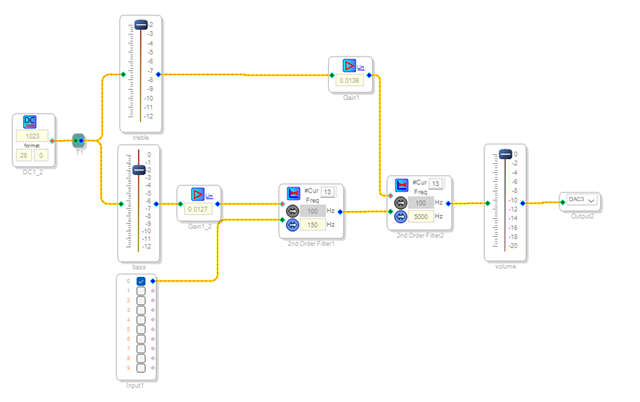
I tried to do direct mode, bypassing filters. It turns out that direct works 100x better than filters :(
Hello Kddddaaaa,
Can you describe what about it works poorly? This will give us an idea of what your expectations are.
What are you expecting it to do?
Dave T
Hello,
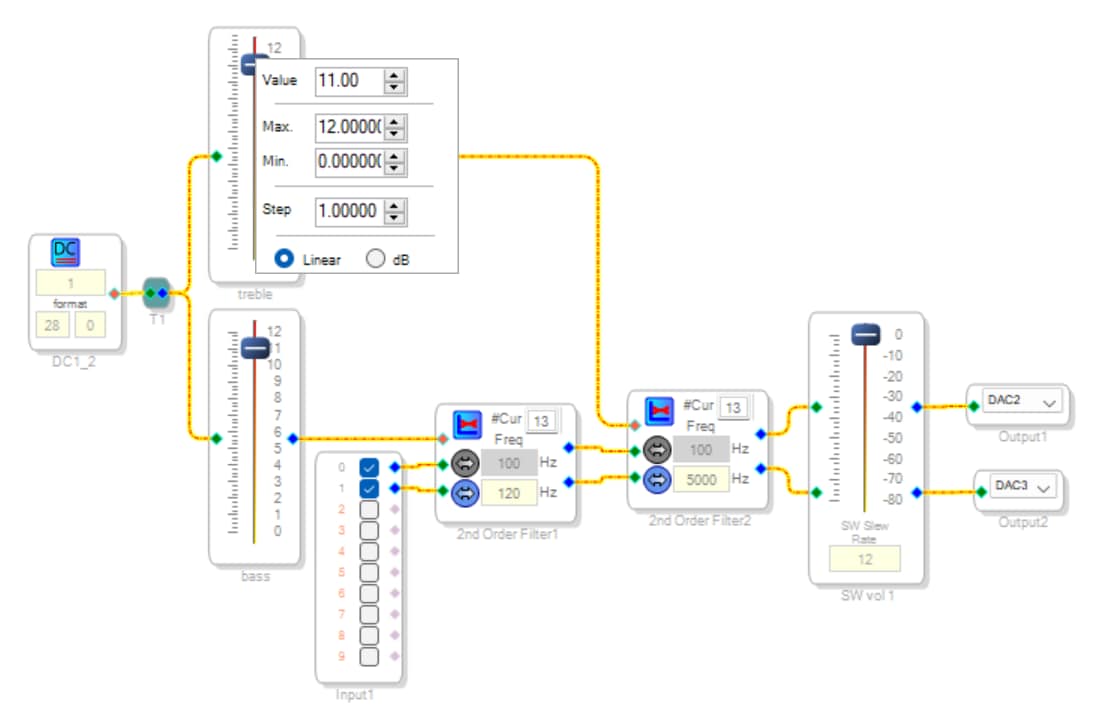
Starting with your tonecontrol project, I made some changes to make it work smoothly. The most important of these is to have the sliders work as a linear (decimal number) multiplier rather than a logarithmic (dB) gain. Each slider multiplies its input of integer 1 by a decimal (5.23) number from 0 to 12, resulting in an integer (28.0) number ranging from 0 to 12. Note that the 13-position lookup filters need a control integer from 0 to 12, not 1 to 13. Going over-range causes the filter to pull random numbers from somewhere in parameter memory, causing no sound or worse. On the 1401 / 1701, this method works with a range as large as 0 -- 15, the largest whole decimal number that the 5.23 format allows. The ADAU1452 and above have a 8.24 decimal format, allowing for whole decimal numbers up to 127. You may wish to view the tutorial, What Are the Number Formats in SIgmaDSP.
To change how a slider operates, right-click on its knob. This brings up the box shown below, where you can choose its type and range.
tonecontrol-mod.zip
BTW -- it sounds really good!
Best regards,
Bob
Please log in to reply.