Implementing Windowing for Constant Magnitude Output in Goertzel Algorithm on ADAU1761
Hello SigmaStudio community,
I'm working on a Goertzel algorithm implementation for 500 Hz detection on the ADAU1761 using SigmaStudio. I've set up the basic algorithm, but I'm trying to achieve a constant magnitude output for a constant input signal. Here's my current situation:
I've implemented the Goertzel algorithm using an IIR filter with these coefficients:
b0 = 1, b1 = 0, b2 = 0
a1 = -1.95985383872752 (for 500 Hz at 48000 Hz sample rate)
a2 = 1
I've set up the magnitude calculation as |y[n]|^2 = y[n]^2 + y[n-1]^2 - y[n]y[n-1]coeff
The issue is that for a constant input signal, the magnitude keeps rising linearly over time. I want to implement a windowing function to get a constant magnitude output. My idea is:
Use a counter to process 4096 samples at a time
At the end of 4096 samples, save the current magnitude value
Reset the Goertzel algorithm (clear the IIR filter state and magnitude calculation)
Hold the saved magnitude value as output until the next 4096-sample window is processed
My questions are:
Is this windowing approach a good way to achieve a constant magnitude output in SigmaStudio?
How can I implement the 4096-sample counter in SigmaStudio for the ADAU1761?
What's the best way to reset the IIR filter and magnitude calculation after each 4096-sample window?
How can I implement the sample-and-hold functionality to maintain the output between windows?
Any advice on implementing this windowing approach to achieve a constant magnitude output would be greatly appreciated. Thanks!
Audio Signal Processors
software
SigmaDSP Audio Processors
adau1761
Hello EA891,
I do not know why you just do not implement a narrow band peaking filter set to 500Hz and then measure the level of the output. Then setup a threshold to trigger if the level is greater than the noise floor? Or wherever you want the threshold? Or, just read the level?
This processor is fairly limited in what you can do so it is a bit more difficult. Yes, you can setup a counter. My first thoughts....
Setup two of these IIR filters with the coefficients you have figured out.
Then setup a counter to count to 4096 and then switch the input of the filters. Have one filter accept the audio and the other just zero. So every 4096 samples you have an output with the audio as an input and the other filter is zeroed out providing there is enough time for it to settle. I am not certain about that.
Then we have hold blocks as well that can hold the data at the end of the 4096 counter. The logic for selecting and switching the inputs can also drive the hold cells.
There are examples on the forum for some of these things. Do a search.
It would be great to include your project.
At the moment I do not have time to work out a project to do this but someone else on the forum may chime in. Let us know if you think that would work?
Dave T
Thank you a lot for your help. I wil try it out!
How narrow of a filter can I achieve for 226Hz in SigmaStudio?
Hello EA891,
I do not have an exact number but rather narrow!
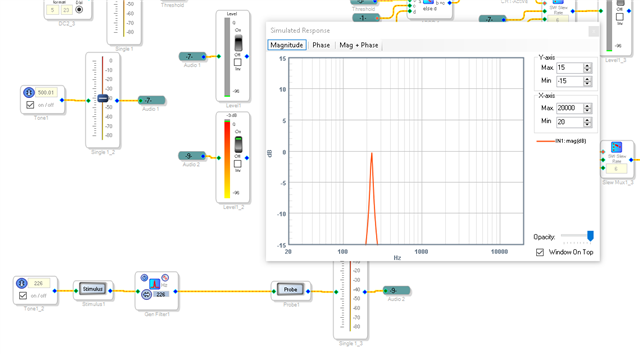
I did a quick experiment using a peaking filter. I can see it a dB down at 230Hz and at 222Hz.
It is 2dB down at 221Hz and 231Hz.
I put this experiment into a project I had in my library that does threshold switching using level on an ADAU1761. You will have to most likely adjust the time constants of the peak envelope generators because this project originally was using 500Hz and 750Hz for switching. You can experiment with the settings to get the performance you need.
Back to the narrow filter. You can grow the filter and add a second section to make a four pole filter so it is even more narrow! I just used this one 2nd order filter set to a Q of 16 which is the max.
Here is a screenshot of the project showing the filter response.
I will attach the project below.
Dave T
ADAU1761 Peak Filter and Threshold Switching.dspproj
Thank you so much! This seems to work fine.
After filtering, I’m using an absolute value block to capture the amplitude envelope, followed by a 30 Hz low-pass filter to smooth the signal. This allows me to observe the amplitude as a stable value.
My goal is to efficiently monitor these amplitude changes in real-time. Is there a more efficient/better method or a different approach within SigmaStudio that you would recommend?
Thank you again for your help!
Best regards
Hello EA891,
Your approach of an Absolute value and a 30Hz filter is technically correct and shows you do understand the problem well.
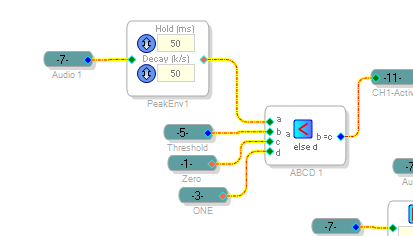
Look at the project I attached. The envelope generators are pretty much the same basic concept of what you are doing but it is more efficient and gives you more intuitive controls. The block does an absolute value and then does an integration with an attack, hold and decay time.
The peak blocks that I used has an instantaneous attack tracks this peak value. So there is no attack time. The hold time is handy to ensure you do not miss any peaks. Generally, you set this to the time interval you are polling the result if you are using an external MCU. This way you do not miss anything. If you are not polling then it is handy for preventing the signal from switching too quickly for a fast peak, you do not want it to switch to one signal and back in micro or milli-seconds. The decay time is fairly clear what effect that has.
If you choose a the "Running Average" or the Signal Envelope" blocks those have a time constant that is the attack time. Then there is a hold and decay. The running average will output the average value and the Signal Envelope block will output the RMS value. These are of course for a pure sine wave. You can calculate the others from one of these blocks. So if you use the peak block you can multiply by 0.707 to get the RMS value. So no need to have multiple blocks.
Here is a screenshot of my project showing the envelope follower block
Then I use the ABCD block to do the comparison with a threshold value and then output a 1 or a 0. This construct using the ABCD block is an If/Then/Else construct in SigmaStudio. It is one of the most handy blocks in the library!
The envelope follower blocks are located in the Dynamics Processors section of the tree toolbox.
Dave T
Please log in to reply.