External SPI Delay on multiple channels using SRAM with different delay times?
Hi Dave:
We have a new project using 1452 with external SPI SRAM for long delay on 4 channel outputs.
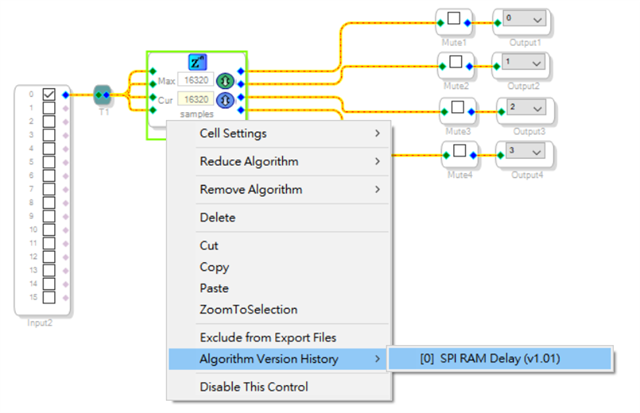
Now we use SigmaStudio 4.7 (SPI RAM Delay V1.01), and it already supports one SPI SRAM chip for 4 channels' delay.
But our application needs 4 separate delay times for 4 different channels, not the same delay time for all 4 channels.
Is there any way to make it possible for our application?
Best regards
Louis
Edit Notes
Changed the title to reflect the question asked... (Dave T)
[edited by: DaveThib at 2:14 PM (GMT -4) on 1 Nov 2024]
Hello Louis,
You can drop in multiple instances of this block and each one can have its own setting. The problem is that you do not have a lot of time to write and read the samples within one sample period. I went into this in detail in this post:
(+) How to use External SPI Delay Module on ADAU1452 with SigmaStudio Dev.Tool? - Q&A - SigmaDSP Processors & SigmaStudio Dev. Tool - EngineerZone
When you drop in a new instance you create another set of SPI read and writes.
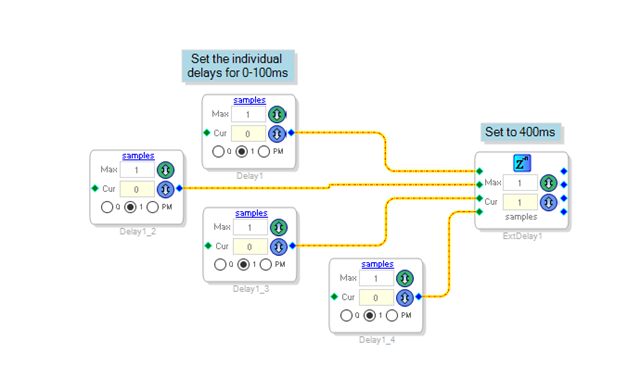
I would analyze your delay needs. For instance, if you need a range of 400-500ms of delay for channel 1. Or most likely the same range for all four channels but just a slightly different setting for each then use a combination of internal and external delay for this purpose.
This is what I am thinking:
Hopefully you will have enough on-chip RAM for the difference in delay that you need for each channel. I just made up some numbers for an example.
I want to also offer some more suggestions. Often most applications do not really need 32 bit data being stored into delay RAM. 24 bit or even 16 bit would be good enough. There are plenty of great sounding 16 bit reverbs around in studios! You just have to limit the levels.
I wrote this post and some example programs where you can pack four channels of 24 bit data into three channels so you only need a three-channel external SPI delay! This allows for longer delay times and also saves on the time it takes to service the delay every sample period. Here is the post:
(+) How to increase Delay time? - Q&A - SigmaDSP Processors & SigmaStudio Dev. Tool - EngineerZone
Dave T
Hi Dave:
Our delay requirement is 500ms for every 4 channels and there should be full range adjustment from 0~499ms for every channel, not a slightly different delay between them.
Is it possible to update the SPI RAM Delay instance to 4 separate delay control parameters for 4 channels?
Best Regard,
Louis
Hello Louis,
If you drop four instances of the SPI Delay into the project it will give you four different controls. The problem is as I mentioned above and in the older post I linked to. Each instance will require its own SPI reads and writes EVERY sample period. If you are running at 48kHz fs and you push the SPI speed up close to the max, do a good PCB layout, increase the pin drive strength I think you will still run into a time problem where there is just not enough time to do it in one sample period. That is what I showed in that older post.
Dave T
Hi Dave:
Thanks for the explanation.
As you said, using 4 instances of the SPI Delay would not have enough time to do it in one sample period, and the same delay times of the SPI Delay instance can't meet our requirements.
Does it mean we have to give up 1452 for our application?
Best Regards,
Louis
Please log in to reply.