MFxLMS growth
Hi,
I'm not quite sure if this is the right place to put forth my question, if in case it's not here please do direct me to where i can find answers to my question.
I'm currently working on an ANC project using that ADAU1466 board. started off with single channel 2meter long y-shaped tube, then moved on to an open setup with a pair of speakers and 1 reference microphone closer to the speaker, both use error microphones as well making it a hybrid (feedforward feedback ) ANC. I've tasted success with both these setups. In both these, I've used the Modified Filtered-X Least Mean Square (MFxLMS) block (under filter-FIR-Adaptive) that accepts 1 reference input, 1 error input, and gives out 1 output.
Now I'd like to move onto using 2 reference microphones and 2 error microphones. the MFxLMS block that i used in the previous setups has an option to grow inputs and outputs, also shown in wiki (wiki.analog.com/.../mfxlms it doesn't show any details, formulation etc at least a hint of the mathematical model implemented when the channel growth is implemented.
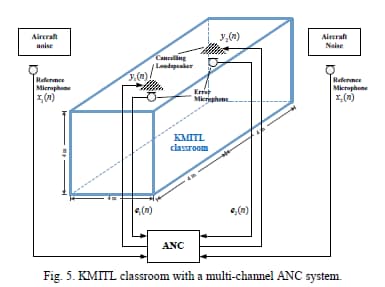
My aim is to mimic a noise cancellation system in a classroom that is situated close to an airfield (A Multi-Channel Feedforward ANC System Using a Novel FXLMS Algorithm in Solving Classroom Aviation-Noise Problems Int. J. Elec. & Elecn. Eng. & Telcomm. doi: 10.1a8178/ijeetc.8.6.320-326) . their setup is as follows:
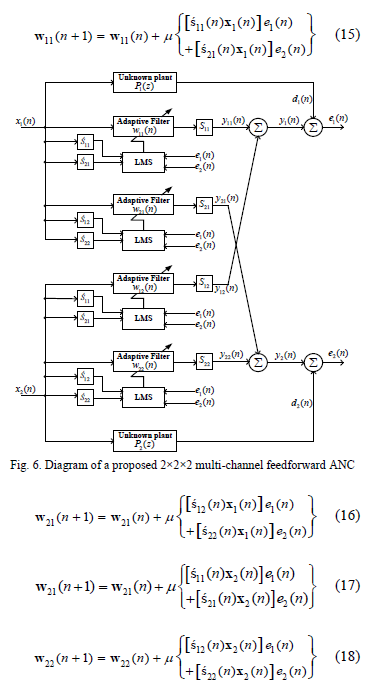
the block diagram and calculations for Multi-channel FxLMS they've come up with the following
i guess my question in short is whether MFxLMS block in SigmaStudio4.7 for ADAU1466, when grown to take 2 reference and 2 error mics, does the calculation shown as in the block diagram. here's my interpretation of the blockk diagram in sigmastudio
MultiChannel Design 1.dspproj
I've not tried it yet, simply because
I'm not sure if this interpretation is correct
I'm not sure if using so many blocks for the same function would be overwhelming.
Besides my question. Please do comment on my approach and advise how I can best improve this program. whether it be lowering the sample rate(as done in the paper i mentioned above) or my using fewer connection aliases, or what other level detectors i can use instead of the one i'm using here.
Much appreciate your response in this.
Sunny
Audio Signal Processors
anc
software
4.7
multi-channel
adau
SigmaDSP Audio Processors
active noise control
MFXLMS
adau1466
Show More
ok
Hello suncha300,
Sorry for the delay in response, we are still working on it.
The team is little overwhelmed lately, and your questions need some time to check the details and reply.
we will post our answers soon.
Regards,
Harish
received.
I've made some progress since, in other words, i tried it: my implementation of the block diagram attached was wrong. simply using the function with growth options in fact does the work which i found after giving it a try
.MultiChannel MFxLMSDesign 2.dspproj (updated program)
I've still not reached the point of satisfactory in terms of the result, it shows reduces noise very scarcely.
We could discuss other matters, if possible. I've used aliases to reduce the clutter, how practically sound is this? can that affect the processing speed?
at the moment I'm using 48kHz as sampling rate, but how different would it be if i used higher sampling rate eg 96kHz, or lower eg 16kHz, or if i opted for multirate, as shown in MFxLMS wiki. where in SigmaStudio can i find information about how these affect differently?
I do need help with setting the sample rate as well. does it simply change the sample rate if i changed it in the drop down in the toolbar? or do i need to make changes in the core control in hardware configuration?
I hope we can get to this faster. but of course, whenever you're available.
cheers!
Hello suncha300,
I can answer some of your questions.
suncha300 said:
I've used aliases to reduce the clutter, how practically sound is this? can that affect the processing speed?
When using a 'T connector or aliases, it will NOT affect the processing speed or add additional DSP cycles to the program. That is just a variable that will be copied and used again in the next modules (as an input). It's all happening within that sample period. i.e all these copies (variable) will be used in the code multiple times, and the entire code runs every sample period. So, this will NOT create a delay in the signal flow or cause additional MIPS.
suncha300 said:
at the moment I'm using 48kHz as sampling rate, but how different would it be if i used higher sampling rate eg 96kHz, or lower eg 16kHz, or if i opted for multirate, as shown in MFxLMS wiki. where in SigmaStudio can i find information about how these affect differently?
It depends on your application,
In higher rates, your audio in and out time is less, but it takes higher MIPS, long filters, etc.
In some applications, such as road noise cancellation, the noise is limited to lower frequencies, so running MFxLMS at a lower rate has some advantages, i.e. lower MIPS, shorter filters, which may improve performance and convergence.
Also note that the Down sampling and up sampling requires filters which have group delay that adds to the overall audio into audio path.
And the multirate processing has to be done a certain way. The DSP core (the DSP sample rate set by start pulse) must be running at the highest rate. then the block processing style of interrupts is used to run the slower rate once every X times the higher rate program is executed.
For example, if your program has 48KHz section and 24KHz section, the DSP core must be run at 48KHz, so the 48KHz thread will be run every sample period and 24KHz section will be run once every 2 times the higher rate program is executed.
suncha300 said:
I do need help with setting the sample rate as well. does it simply change the sample rate if i changed it in the drop down in the toolbar? or do i need to make changes in the core control in hardware configuration?
The sample rate given at the top of sigma studio is just a software sample rate which will be used as a reference in filter coefficients, compressors, timer, oscillator calculations. It must be same as the DSP sample rate (that can be set by using start pulse register), so that filter calculations and other sample rate related modules will work properly.
This will help you understand more about sample rates.
Hope this helps!
Regards,
Harish
Thank you so much Harishgowtham , All this is a great help and answers all questions i have.
1. can use as many aliases and T-connectors as needed
2. when doing multi-rate processing, the core speed should be set to the highest rate that will be used to process, and then other rates shall be used by use of downsampling (of great importance to me)
3. proper use of start pulse to change core clock speed and match dropdown to match the core clock speed.
Much appreciate the response.
Please log in to reply.