Does anybody have an example of how to use/read a SPST in order to handle a multiplexer in Sigma Studio?
Hello everybody, I am using the ADAU1701MINIZ with SigmaStudio, I have read the AN-951 regarding the use of hardware controls with GPIO pins, there are several example implementations of GPIO in software, but it is missing an example using SINGLE-POLE SWITCH INPUT, does anybody have an example of how to use/read a single-pole-single-throw switch in order to handle a multiplexer in Sigma Studio?
In advance thank you
Ivan
Hello Ivan,
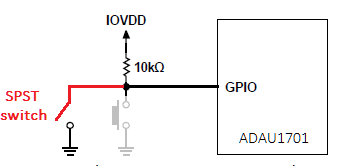
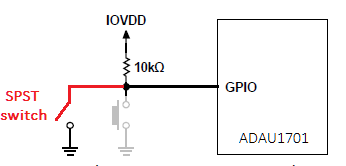
Starting with Figure 1 from App Note AN-951, substitute your SPST switch for the pushbutton:
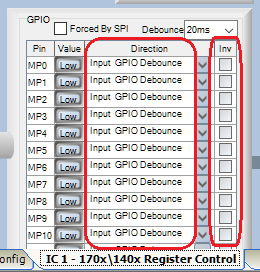
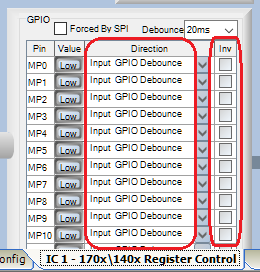
In SigmaStudio, go to the Hardware Configuration window and select the IC1 -- 1701 \ 1401 Register Control tab. All the MP pins default to GPIO digital inputs, so you're all set here. You could choose to invert the logic if desired (I didn't).
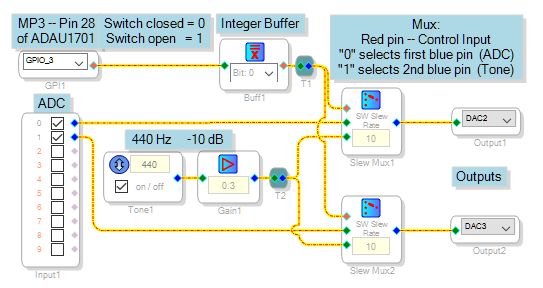
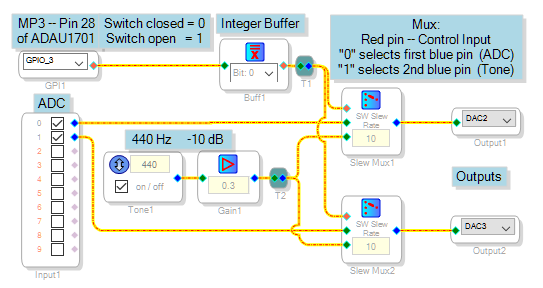
Your schematic might appear like this one. Here I'm using MP3, which is wired to the center pushbutton switch S3 on your Eval-1701MINIZ board. As shown this project selects between ADC input and a tone oscillator:
Perhaps the most important part (and the one we beginners often forget) is the Buffer Gate (labeled "Integer Buffer" above). What comes out of the GPIO into the schematic is a decimal value, either 0 or 1.000 . This 1.000 value is a binary 1 with 23 zeros following. The Multiplexers expect an integer input, where a "1" is just a binary 1 by itself. A decimal 1.000 is 2^23 times too large for the Mux! Thus, we need to convert decimal to integer when driving the Mux. The Buffer Gate performs this function.
Best regards,
Bob
Hi Ivan (and Bob):
There is new SigmaStudio Beta that will be released within the next week or two, that includes an algorithm for Routing signals. You can think of it as a digital patch bay. Using this new element can save a number of instructions and improve usability of complex designs. They will have Voltage control versions (Index selectable) as well as version where users can download the different routing coefficients from a uC.
Hope this helps and simplifies some of your designs.
Regards
Miguel
thank you Bob, I will try it
Ivan
Please log in to reply.