Export Automatically?
I am doing some scripting for SigmaStudio 3.8, and I would love to be able to export (*.params, *.hex, ect.) files eaither through a script, automatically through a setting in SigmaStudio for everytime I compile, or on the call of a method (just some sort of consistant automation), is there any way to do this?
Thanks!
- Chris
P.s How come it is not possible to get properties as well as set properties through the SigmaStudio Scripting API? If it were possible
I would not have to read the files.
P.s.s How come the output on these files is inconsistant, for example: I have two filters in my project F0 and F1, one has the coefficants 2, 1, 3, 2, 1 and the other (F1) 2, 1, 3, 1, 3 however F0 gets recorded twice in *.params and F1 does not get recorded at all, this pattern does not seem very consistant either, sometimes they both get exported or nothing does. Could someone explain this?
sigmastudio
scripting
Hi Chris,
Yes it is possible to export files automatically, and there are actually 2 ways to do this.
--------------------------------------------------------------------------------------------------------------
Method 1: via a script and the "ProjectExportSystemFiles" command. You must have compiled the project first (either manually or via script):
ss.ProjectLinkCompileDownload();
ss.ProjectExportSystemFiles( "C:\\Export\\ScriptExport" );
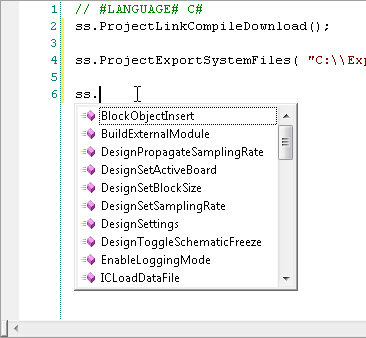
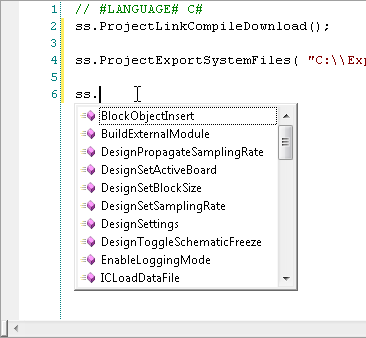
Note that you can see a list of all available script commands using the "intelli-sense" in the script window. Type "ss." and a list of commands is displayed:
--------------------------------------------------------------------------------------------------------------
Method 2: (Requires the newest version 3.9.2 Beta or later)
As of version 3.9.2 there is a new feature which will perform exactly this task.
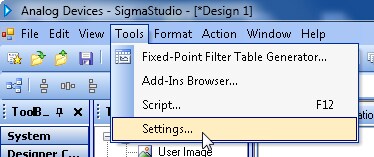
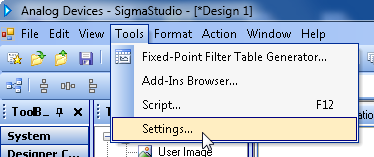
Open the Tools | Settings..." menu:
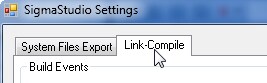
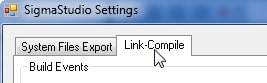
Select the "Link-Compile" tab:
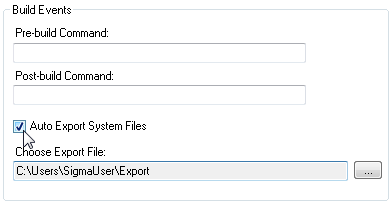
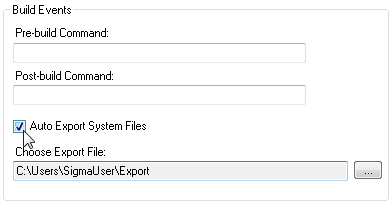
Check the "Auto Export System Files" option and choose a path and export file name for the export files.
Click "Apply" and close the settings dialog.
Now if you run the "Link Compile Connect" command the files will be written on each compilation. (NOTE: this function does not work with the "Link Compile Download" command, that's a known issue in this release.)
Best regards,
John
Regarding your other questions:
Unfortunately no, the scripting interface does not currently support a "GetProperties". But it does support register and parameter read which allows values to be read back directly from the hardware.
And regarding the output file formatting, I would need to know which processor you are referring to to answer your questions, the output is different for each processor. One thing to check, execute "LinkCompileDownload" before the Export System Files command to ensure all parameter addresses have been defined and properly linked.
Best regards,
John
Thank you! What you said really helped. I would like to avoid register I/O at the moment because the scripts I am writing could work with any given processor. I am working with the ADAU1772 at the moment. The only file I really want to read is *.params to gather meta data on the project itself. Does that change for all processors as well? I looked at my linker here is what it had for Node List (s) (if that helps), it does not look like anything is wrong, but I could be incorrect (I am a software guy on this project, I do not know much about hardware):
-IC 1 -> ADAU1772
0 Input17721 O_C0_A0_P3_out Link2 O_C0_A0_P4_out Link0
1 FilterDouble2 I_C12_A0_P1_in Link0 O_C12_A0_P2_out Link1
2 FilterDouble1 I_C9_A0_P1_in Link2 O_C9_A0_P2_out Link3
3 Output17722 I_C7_A0_P1_in Link1
4 Output17721 I_C5_A0_P1_in Link3
Hello Christopher,
I recommend to download the latest SigmaStudio 3.9.2 Beta version
http://www.analog.com/en/dsp-software/ss_sigst_02/sw.html
This version may help you on your export files problem you previously had. I did some fixes regarding the 1772 export files.
Let me know if those got resolved for you.
Thanks,
Wilfrido
This question has been assumed as answered either offline via email or with a multi-part answer. This question has now been closed out. If you have an inquiry related to this topic please post a new question in the applicable product forum.
Thank you,
EZ Admin
Please log in to reply.